


Ulysse Speedometer Pro
3.4914.00 Reviews
App Specs
- Version
- Varies with Device
- Updated On
- License
- $1.99
- Downloads
- 100,000+
- Developer
- binarytoys
- Categories
- Auto & Vehicles
- Platform
- Android
Screenshots
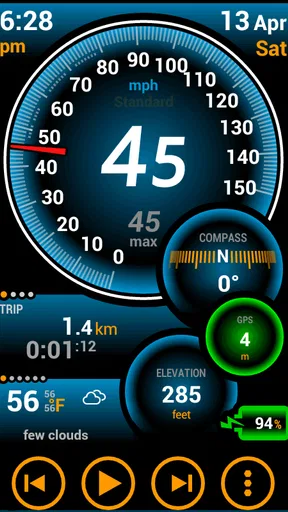
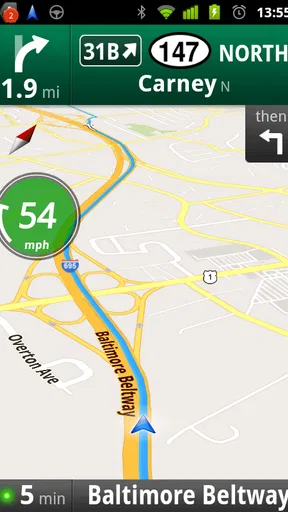
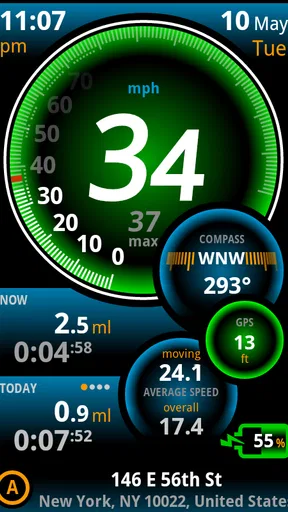
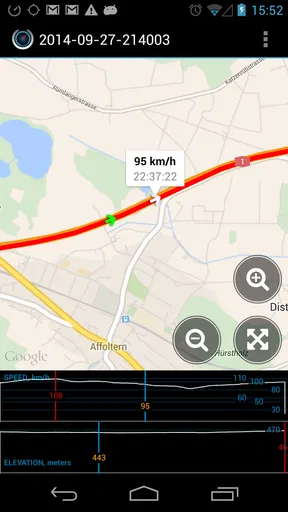
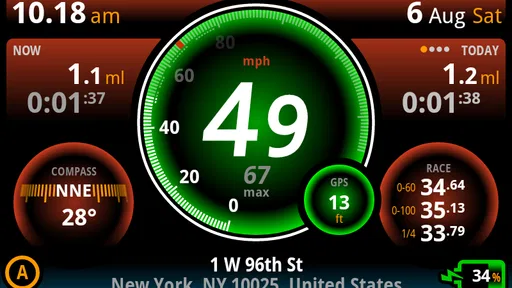
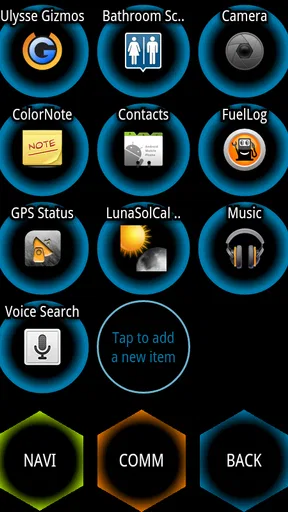
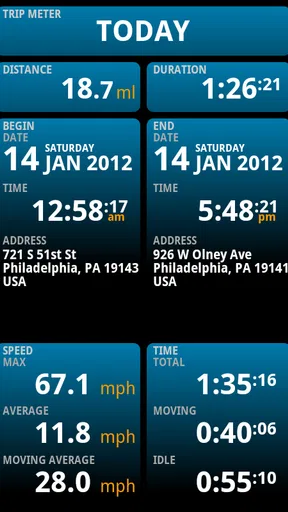
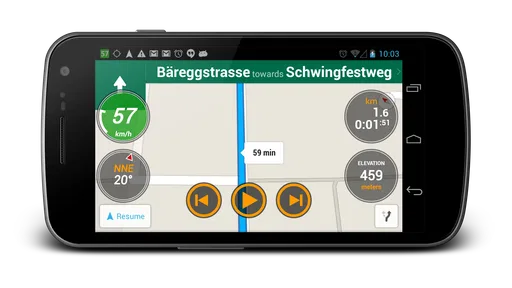
 Analysis by AppCompare
I approached Ulysse Speedometer Pro as a practical driving tool rather than a feature-packed navigation app. Its purpose is easy to understand: turn an Android phone into a dedicated speedometer. That narrow focus is also the main reason to consider it. If you want a simple way to keep an eye on your current speed, it may feel more direct than opening a full navigation application. If you expect route planning, traffic information, or a complete trip assistant, you will probably be happier with a broader alternative.
The app comes from binarytoys and sits in the Auto & Vehicles category. It is a paid app costing $1.99, carries an Everyone age rating, and has been available since May 12, 2011. Its average rating is 3.4 from around 4.8 thousand ratings, while the app has passed 100 thousand installs. Those figures suggest a product with a long presence and a recognizable audience, but they also tell me to keep expectations realistic: this is a focused utility, not a universally loved replacement for every driving app.
What I looked for before recommending it
I looked beyond the appeal of adding a large speed readout to a phone: the useful test is whether the display fits a driver’s routine without demanding extra attention. In this section, I explain why I’d judge setup, glanceability, and the job you need the app to do before deciding it belongs in the car.
The right question is not “does it have everything?”
For a speedometer app, I care about a few practical things before anything else. Can I read the display quickly without studying a crowded screen? Does it make sense during an ordinary drive? Is the information useful enough to justify installing a separate tool when most phones already offer navigation apps? And does the app’s focused design make driving less distracting, or does it simply add another screen to manage?
That last question matters more than it may seem. A phone mounted in a car should support attention, not compete with it. I would use this kind of app only after setting it up while parked, choosing a visible mounting position, and checking the display before moving. The best speedometer is not the one with the most controls; it is the one that lets me confirm my speed with a brief glance.
Who is most likely to appreciate it?
I see the strongest fit for drivers who want a dedicated speed display, people using vehicles with an unreliable or hard-to-read dashboard, and anyone who prefers a clean utility over a map full of extra information. It can also make sense when a passenger is monitoring speed during a long trip, or when someone wants a second reference while learning how a vehicle behaves at different road speeds.
It is less convincing for someone who already keeps a navigation app open on every journey and is satisfied with the speed information shown there. It is also not the right choice if you are looking for driving records, route history, fuel tracking, roadside assistance, or a complete vehicle-monitoring system. A narrow tool should be judged by how well it handles its one job, not by features it was never designed to provide.
Worth Reading Before You Choose

EA SPORTS FC Mobile 26 Is a Bigger Football Game, but It Takes Time

Flipboard Shows What News Apps Must Do Beyond the Feed

Switching to Android Auto Means Rethinking Your Driving Routine

Google Calendar Makes a Crowded Week Easier to Manage

Ludo King Makes the Most of the Minutes Between Plans

Baby Panda World Brings Quick Play to Modern Phones, but Its Game Library Feels Busy
My everyday test scenario
Imagine borrowing a car for a weekend trip. The dashboard speed display is small, the phone mount is already positioned near the steering wheel, and you do not need directions because you know the route. In that situation, opening a full navigation app feels unnecessary. A dedicated speedometer can keep the screen focused on the one piece of information you actually want.
I would prepare it before leaving, place the phone where it can be seen without blocking the road, and avoid changing settings once the car is moving. That workflow is more important than any visual detail. The app is useful when it reduces the number of things competing for attention; it becomes counterproductive if I keep adjusting it while driving.
Where the focused design works best
A focused screen has its clearest value when I already know where I’m going and want to avoid opening a map just to check speed. Here I consider how that narrow purpose can make an ordinary drive feel simpler, while also pointing out the boundary between a handy reference and a substitute for the vehicle’s instruments.
A simpler alternative to a full navigation screen
The clearest strength here is concentration. Navigation apps are built around maps, turns, destinations, traffic, and search. Even when they show speed, that information is usually one element among many. A dedicated speedometer changes the priority: the speed display becomes the reason for opening the app, not a small accessory inside a larger interface.
That difference is valuable in specific situations. On a familiar commute, I may not need a map at all. On a private track or controlled driving environment, I may want a speed-focused screen rather than directions. When testing a replacement vehicle, I may want to observe the dashboard and the phone display side by side. In each case, the app’s limited purpose can be an advantage.
Useful as a temporary dashboard companion
I would not treat a phone-based speedometer as a permanent substitute for a properly functioning vehicle instrument. I would use it as a companion while diagnosing a dashboard problem, checking whether a speed display seems plausible, or making a vehicle easier to monitor for a passenger. That distinction prevents a common mistake: assuming that an app can replace the safety importance of the car’s original instruments.
A practical tip is to compare the phone display with the vehicle’s dashboard while stationary and during a short, familiar drive. Do not use a speedometer app to justify driving faster or to settle an argument about a precise reading. Its value is as a convenient reference, not as a reason to ignore road signs, local limits, or the condition of the phone’s positioning system.
The paid model changes the decision
At $1.99, the purchase is small, but it still changes how I judge the app. A free download can be worth trying casually; a paid utility needs to solve a specific problem well enough that I will keep it installed. The price is easiest to justify when I regularly need a dedicated speed display and do not want the distractions of a navigation package.
The purchase is harder to justify if I will use the app once out of curiosity. Before buying, I would ask myself whether my normal driving routine actually benefits from a separate speedometer. If the answer is no, the usual navigation app, the car’s own dashboard, or a purpose-built hardware display may be a better use of money and attention.
What the user base tells me
The app has attracted over 100 thousand installs and has gathered around 4.8 thousand ratings, so it is not an obscure experiment with no history. At the same time, the 3.4 average indicates a mixed experience among users. I read that as a reason to be precise about the purchase: it may work well for a person who wants this exact type of utility, but it is not a safe recommendation for everyone who drives.
The long availability also gives it a familiar, established feel within this small category. Still, age alone is not proof that it will match every modern phone, dashboard layout, or driving habit. I would install it with enough time to test the screen, mounting position, and general usability before relying on it for a long journey.
Small habits that make it more useful
- Set it up before starting the engine. Decide where the phone will sit, then check that the display is visible without covering important road information.
- Use it for one purpose at a time. If you need directions, use a navigation tool. If you need a speed reference on a familiar route, this focused app may be less distracting.
- Keep the vehicle’s instruments as the primary reference. The phone is a convenience, not a replacement for a working dashboard or responsible driving.
- Test your routine locally first. A short drive tells you more about readability and mounting comfort than installing it just before a long trip.
These habits sound simple, but they reveal the app’s real trade-off. Its usefulness depends heavily on how the phone is placed and how disciplined the driver is about leaving it alone. No speedometer screen can compensate for a poor mount or an unsafe viewing angle.
Where the experience may feel limited
The narrow purpose can also become friction. I may open the app expecting a complete driving companion and quickly realize that I still need another tool for directions, traffic, destinations, or trip planning. Switching between apps while driving is exactly what I want to avoid, so the dedicated approach works best only when I have already decided that speed is the sole information I need.
A phone also introduces practical concerns that do not affect a built-in instrument in the same way. The device needs to remain securely mounted, the screen must stay readable in changing light, and the driver has to think about battery use and placement. I would not mount it in a position that blocks the windshield or requires looking down for more than a moment. If your vehicle already has a clear, reliable dashboard, the extra phone may add more setup than value.
When another category is a better fit
A speed-focused tool is not automatically the best choice for every journey, and recognizing that early can save both money and distraction. I compare the situations where I’d rather use navigation, hardware, or a broader vehicle tool, so the next section can help you match the category to the task.
Navigation apps for trips with decisions
If I am driving somewhere unfamiliar, a navigation app is usually the better choice. Its map and route guidance matter more than having a large speed display. The speed readout inside a navigation app may be less prominent, but the overall tool answers the bigger question: where should I go next?
This is the key comparison. Ulysse Speedometer Pro can be preferable when I already know the route and want a focused reference. Navigation wins when I need guidance, traffic context, destination search, or a single screen that combines travel decisions with basic driving information. Choosing between them should depend on the journey, not on which app has the longer feature list.
Vehicle hardware for permanent use
For a long-term dashboard problem, a dedicated hardware speed display may be more suitable. Hardware does not require me to repurpose my everyday phone, and it can be installed as part of the vehicle setup. That option may cost more or require more effort, but it is worth considering when the speed display is needed every day rather than occasionally.
The app makes more sense when flexibility matters. I can use the phone I already carry, remove it when I do not need it, and avoid installing equipment in the car. The trade-off is that the phone remains a general-purpose device, with notifications and other distractions that a dedicated instrument does not have.
Vehicle-monitoring tools for deeper information
Some drivers want more than speed. They may be interested in diagnostic information, driving behavior, fuel use, trip records, or maintenance details. A simple speedometer is not the category I would choose for those needs. A vehicle-monitoring system is more appropriate when the goal is to understand the car, not simply read one driving value.
This is also where I would advise against buying based on the word “Pro” alone. The name suggests a more advanced edition, but my decision would still come from the actual task I need to complete. If I need a focused speed display, the app can be relevant. If I need a professional fleet or vehicle-analysis workflow, I would look elsewhere.
When the app should stay off
I would skip it for drivers who are tempted to stare at changing numbers, adjust the screen frequently, or use a phone without a secure mount. I would also avoid depending on it when the vehicle’s dashboard is already clear and accurate enough. The app is not automatically safer simply because it shows speed in large form; safe use depends on preparation, placement, and brief glances.
It is also a poor match for anyone expecting the app to transform an old phone into a complete automotive computer. A focused speedometer cannot replace careful driving, proper vehicle maintenance, or attention to road signs. That may sound obvious, but it is the most important boundary around this purchase.
What switching to it really involves
Trying a dedicated speedometer involves more than installing an app: I’d need a stable phone position and a routine that keeps adjustments out of the drive. This section looks at that practical change and offers a simple way to tell whether the focused display is genuinely easing a recurring annoyance.
The setup cost is mostly behavioral
The financial cost is modest, but the bigger cost is changing how I use my phone in the car. I need to decide whether the app will replace a navigation screen, sit beside the dashboard, or be used only occasionally. I need a stable mount and a habit of configuring everything before moving. If I already have a good routine with another app, switching is worthwhile only if the dedicated display solves a genuine annoyance.
I would begin with a short, familiar journey. During that drive, I would evaluate whether the speed information is easy to catch at a glance and whether the phone’s position feels natural. If I find myself leaning, squinting, or reaching toward the device, the setup is not working. That is a useful test because it focuses on the real driving experience rather than the appeal of installing something new.
How to decide after the first few uses
After several ordinary drives, I would ask three questions. Did I use the app because it was genuinely clearer than my dashboard? Did it reduce distractions compared with a navigation screen? And did I leave it untouched once the car was moving? If the answer to all three is yes, the purchase has a clear purpose.
If I still needed another app for every trip, or if the phone display felt awkward, I would uninstall it and return to the simpler setup. There is no benefit in keeping a specialized tool merely because it is inexpensive. A good utility earns its place by removing friction from a repeated task.
A realistic ownership expectation
I would expect this app to be most valuable in bursts: a borrowed car, a temporary dashboard issue, a familiar route where navigation is unnecessary, or a situation where a passenger wants to monitor speed. I would be more cautious about making it the permanent center of my driving setup. That is not a criticism of the concept; it is a recognition that a smartphone-based instrument has different strengths from a built-in one.
The Everyone rating makes it broadly approachable, but age suitability does not answer the practical question of whether it belongs in a particular vehicle. The deciding factors are visibility, mounting, driving habits, and the information needed on each journey. Those are more important than the app’s label or its install history.
My recommendation for the right driver
I recommend Ulysse Speedometer Pro to someone who wants a dedicated, uncomplicated speedometer and already understands its boundaries. The $1.99 price is reasonable when the app replaces a specific inconvenience, especially for familiar drives where a full navigation tool feels excessive. Its long presence and broad install history make it a credible option in this narrow category, while the 3.4 average encourages a sensible trial rather than an unquestioning recommendation.
I would choose it over a navigation app when I do not need maps or route guidance and want the screen centered on speed. I would choose navigation instead when the journey involves unfamiliar roads, changing routes, or traffic decisions. I would choose hardware instead when I need a permanent, dedicated instrument. That category-based decision is more useful than calling one option universally best.
My final advice is to prepare it while parked, test it on a short route, and keep the vehicle’s own instruments and road signs as the priority. If the app gives you a quick, comfortable speed reference without making the phone another distraction, it can be a sensible little tool. If your needs extend beyond that single job, spend your attention on an alternative designed for the wider task.
Pros
- Large
- easy-to-read speed display is useful while driving.
- Supports multiple speed units for different regional preferences.
- Trip statistics help track distance
- duration
- and average speed.
- A customizable interface makes key information easy to view.
- Can be useful for cycling
- walking
- boating
- and other activities.
Cons
- Accuracy depends on GPS signal quality and device positioning.
- Continuous GPS use can drain the phone battery quickly.
- Some features may require permissions that privacy-conscious users dislike.
- Readings can fluctuate in tunnels
- cities
- or areas with weak reception.
- The interface may feel excessive for users seeking a basic speed display.
FAQs for Ulysse Speedometer Pro
What is Ulysse Speedometer Pro used for?
Ulysse Speedometer Pro is a GPS-based dashboard app designed to display your current speed, direction, altitude, distance, and other trip information on a phone or tablet. It can be useful in a car, on a motorcycle, bicycle, boat, or while walking. The app is mainly intended as a supplementary speedometer and travel computer, not as a replacement for a vehicle’s certified instruments.
Does Ulysse Speedometer Pro require an internet connection?
The app primarily uses your device’s GPS or location services to calculate speed and position, so many of its basic functions can work without mobile data or Wi-Fi. However, features that depend on online maps, weather information, map tiles, sharing, or other connected services may require an internet connection. GPS performance can also be affected by buildings, tunnels, trees, weather, and the quality of your device’s location hardware.
Is Ulysse Speedometer Pro accurate enough for driving?
Ulysse Speedometer Pro can provide a helpful real-time estimate of speed, especially when the device has a clear view of the sky and remains securely mounted. Nevertheless, GPS readings may briefly lag, fluctuate, or become inaccurate in tunnels, urban areas, mountainous regions, or during poor reception. Drivers should always follow the vehicle’s certified speedometer, posted speed limits, and local traffic regulations.
What information and customization options does the app provide?
The app is built around a customizable dashboard rather than a single speed display. Depending on the device and version, users may be able to view information such as current and maximum speed, trip distance, altitude, heading, coordinates, acceleration, and travel statistics. Display layouts, units, colors, and warning preferences can make the screen more suitable for driving, cycling, or other outdoor activities.
Is Ulysse Speedometer Pro safe to use while driving, and what permissions does it need?
The application normally needs access to your device’s location so it can calculate speed, direction, distance, and related GPS data. It may also use notifications or background location features for selected alerts and tracking functions. For safety, configure the app before starting your trip, mount the phone where it does not obstruct visibility, and never interact with the screen while moving. Permission availability can vary by Android or iOS version.


